Flight Tracker: Live Radar
GPS soft LabsTravel & Local
0.00.00 Reviews
- Version
- 3.0.5
- Installs
- 10.00K
- Age Rating
- Everyone
Screenshots
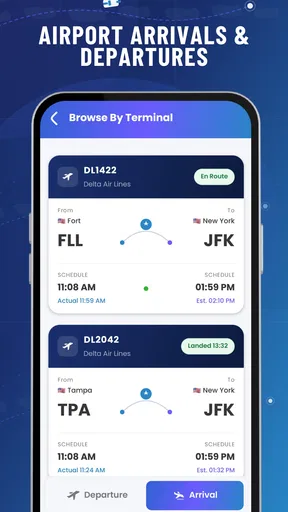
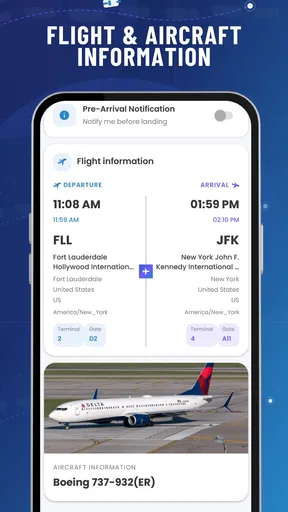
Our Review of Flight Tracker: Live Radar
 Analysis by Appyee
When someone in my household is flying, I want answers quickly rather than a chain of messages asking whether the aircraft has boarded, departed, or landed. Flight Tracker: Live Radar is built for that moment. It is a free travel and local app from GPS soft Labs that brings flight tracking, status information, delays, arrivals, departures, and alerts into one place. I found it most useful as a shared reference during travel days, especially when several people are coordinating around the same airport visit.
The app is available for everyone from a content-rating perspective, runs on Android 8.0 or later, and has reached over ten thousand installs. Its current version is 3.0.5. Those details matter in a household because an older spare phone or a relative’s device may still be suitable, while the app’s free entry point makes it easy to try before deciding whether its optional paid items are worthwhile.
How Flight Tracker: Live Radar works in a shared household
My preferred use is simple: one person checks the flight, then shares the practical conclusion with everyone else. Instead of forwarding a vague “it looks delayed” message, I can look at the live radar and the flight’s current status, then tell a pickup driver whether leaving now makes sense. That turns the app into a coordination tool rather than something used only by the passenger.
A realistic example is a family collecting someone from the airport in the evening. The passenger can keep an eye on the departure and arrival information, while the person at home checks the same flight before setting out. If the schedule changes, an alert can be more useful than repeatedly opening the app. The important habit is to treat the app as a shared source of updates, not as a replacement for communication about where people are physically waiting.
This is also helpful when different members of a household have different roles. One person may be responsible for luggage, another for transport, and another for watching a child or an elderly relative. A flight tracker reduces the need for everyone to monitor the same details constantly. I particularly like the idea of using it before leaving for the airport, then again near the expected arrival window, rather than staring at the radar throughout the entire journey.
There is a useful trade-off here. A live map is easy to understand at a glance, but a map alone does not tell the whole story of an airport operation. Gate changes, baggage collection, security queues, and traffic outside the terminal can still affect the plan. I use the radar to understand the aircraft’s progress and the status information to guide timing, but I would not promise someone an exact pickup minute based only on the aircraft icon.
Setting it up without blurring personal boundaries
For a shared device, I would keep the setup deliberately simple. The phone owner can install the app, choose the relevant flight information, and decide whether alerts are useful for that device. If the phone belongs to a passenger, that person may want updates about their own journey. If it belongs to the person waiting at home, the focus may instead be the arrival flight.
I would avoid treating one household phone as if it were a complete travel command center. A shared screen can show useful flight information, but it should not become the place where everyone assumes personal travel details are automatically available. If several people travel at different times, a quick verbal agreement about which flight is being watched prevents confusion, particularly when two flights use the same route or have similar schedules.
The free price is a low-friction starting point, but optional in-app items range from $4.99 to $99.99 per item. I would not make a purchase simply because the app is open on a family device. First, I would use the basic tracking workflow and decide whether the additional value fits the household’s needs. On a shared phone, the person making a purchase should be clear about what it is for and who will benefit from it.
This matters even more when a child uses the device. The app has an Everyone content rating, which makes it broadly suitable from an age-content standpoint, but that does not mean every purchase decision should be left to a young user. I would keep payment choices with the adult who manages the device and explain that the free download and optional paid items are separate decisions.
Coordinating flights with less back-and-forth
The strongest household workflow is to assign one person as the information checker and one person as the decision maker for transport. The checker watches the flight status, delays, arrivals, or departures. The driver decides when to leave. This separation sounds small, but it prevents a common mistake: assuming that the person reading the aircraft status is also able to judge traffic, parking, or terminal access.
Alerts can help when the timing is uncertain. I would use them as prompts to check the situation, not as automatic instructions to start driving. A delay may change the best departure time, but a short delay can also be revised. The practical tip is to combine an alert with a fresh look at the current status before anyone commits to a long journey.
For a passenger coordinating with relatives, the app is most useful when the family agrees on what each update means. “The aircraft is moving” is not the same as “the passenger is ready to be collected.” Arrival information can indicate progress, but the passenger may still need time to leave the aircraft, collect bags, and reach the meeting point. I found that setting expectations around those stages avoids more frustration than simply checking the radar more often.
Another non-obvious use is reducing unnecessary airport trips. If someone is planning to meet a traveler inside the terminal, they can wait at home until the flight’s progress makes the visit worthwhile. That is especially practical when the airport is far away or parking is expensive. The app cannot solve every ground-side delay, but it can help the household avoid reacting to the original timetable as if it were guaranteed.
What the radar is good at, and where I stay cautious
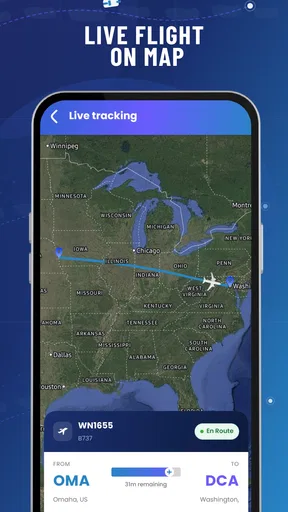
The radar view gives the app a more immediate feel than a plain timetable. I can understand whether a flight appears to be progressing and use that visual context alongside arrival or departure details. For someone who thinks spatially, this is easier than reading a sequence of times without knowing where the aircraft is in relation to the airport.
Still, I would not use the map as the only source of truth. A visible aircraft position and an official operational status answer different questions. The map helps with movement; the status helps with the flight’s recorded state. When the two seem out of step, I would pause before making a firm promise to a passenger or driver.
That distinction is one of the most important practical lessons with this kind of app. Live tracking feels precise, but travel plans are not precise just because the screen is animated. Weather, airport procedures, taxiing, baggage handling, and road traffic all sit outside the aircraft’s position. Flight Tracker: Live Radar is valuable when it improves awareness, not when it encourages false confidence.
I also recommend checking the correct flight carefully before relying on an alert. In a busy household, a person can easily follow the wrong departure if the route or timing looks similar. A quick confirmation with the traveler is worthwhile. This is a small step, but it prevents an alert about one person’s journey from being mistaken for an update about another.
Age, trust, and shared-device habits
Because the app is rated for Everyone, I can see it fitting a household where a teenager wants to understand a trip or help monitor a relative’s arrival. The interface concept is accessible: look up the flight, read its status, and use the radar for context. I would still introduce it as an information tool rather than a way to track a person’s every movement.
That boundary is important. A flight tracker follows the journey of an aircraft, not a passenger’s exact location inside an airport or after leaving it. If a child is traveling, the responsible adult should still agree on check-ins, meeting points, and emergency contacts separately. The app can support coordination, but it does not replace the trust and communication needed for family travel.
On a shared device, I would also be careful with notifications. An alert appearing on a lock screen may reveal travel plans to anyone who picks up the phone. That may be harmless in many homes, but it is worth considering when the device is shared with guests, children, or people who are not part of the trip. A quieter notification approach may be preferable when privacy matters.
The same principle applies to older relatives. The app can give them a direct way to see whether a flight is delayed or approaching, but a family member should not assume that a status update means the traveler is immediately available. I would pair the app with a simple phone call or message at the important handoff points, especially if the passenger needs assistance.
How it compares with usual travel alternatives
The usual alternatives are an airline’s own app, an airport website, a search engine, or asking the traveler to send updates. Each has a different strength. An airline app may be better for passenger-specific actions and airline communication. An airport site may be more useful when the main concern is terminal information. A search engine can be quicker for a one-off lookup. Messages from the traveler are essential when the question is about their personal location.
Flight Tracker: Live Radar makes more sense when I want a focused tracking view that combines flight movement with status, delay, arrival, departure, and alert information. It is especially convenient for the person waiting at home, because that person may not have access to the passenger’s booking account or want to install a full airline application.
The limitation is that a focused tracker should not be mistaken for a complete airline service. If I need booking management, boarding documents, seat changes, or passenger-specific instructions, I would go to the airline instead. If I need airport parking or terminal directions, I would use the airport’s own resources. The best choice depends on the question being asked, and this app is strongest when the question is, “What is happening with this flight right now?”
Another difference is household accessibility. A relative who is not traveling may find a dedicated tracker less intimidating than an airline app filled with booking features. On the other hand, a frequent traveler who already manages every trip through an airline application may see little reason to add another tool. I would recommend this app more readily to coordinators, pickup drivers, and families sharing responsibility than to someone who only wants a boarding pass.
Who should use it and who should skip it
I would recommend Flight Tracker: Live Radar to people who regularly collect travelers, monitor relatives’ journeys, or want a simple way to follow departures and arrivals without relying on constant messages. It is also a sensible option for households with a spare Android phone that meets the minimum operating-system requirement and can serve as a travel information screen.
I would be more cautious recommending it to someone who expects exact door-to-door timing. The app can help explain the flight’s progress, but it cannot account for every step after landing. I would also point frequent business travelers toward their airline’s app when booking tools, boarding access, or account-specific travel management matter more than a radar view.
Families should think about the device owner before installing it. A personal phone gives the traveler control over alerts, while a household tablet or spare phone can be better for shared monitoring. The second option is convenient, but it requires agreement about who checks the information, who receives alerts, and who makes decisions based on them.
The optional purchase range also makes the app less straightforward for households that want every useful function without spending time evaluating upgrades. I would start with the free experience, observe how often the family actually uses it, and only then consider whether a paid item solves a recurring problem. A large household should not assume that paying automatically improves coordination.
My household verdict
After using it as a travel coordination tool, I see Flight Tracker: Live Radar as a practical companion for the space between an airline’s official service and a family group chat. Its live radar, flight status, delay information, arrival and departure details, and alerts give a household a clearer shared picture of a journey. The app is free to begin with, and the Everyone rating makes it approachable for mixed-age use when an adult handles device and purchase decisions.
My main advice is to use it with sensible boundaries. Confirm the flight, treat alerts as prompts rather than guarantees, and remember that aircraft progress is only one part of a pickup plan. Keep personal travel conversations separate from what the screen shows, particularly when children or shared devices are involved. Those habits make the app more useful and prevent it from being treated as a complete substitute for direct communication.
For me, the best reason to install it is shared awareness without constant checking and messaging. GPS soft Labs has put the useful travel basics in one focused app, and the current version gives Android users a straightforward way to follow a flight. I would choose it for family pickups, airport coordination, and relatives who want a readable view of a journey. I would skip it when I need booking management or exact passenger-level information, where an airline’s own tools are the better fit.
Verdict
Strengths of Flight Tracker: Live Radar
- Real-time aircraft positions are easy to follow on the interactive map.
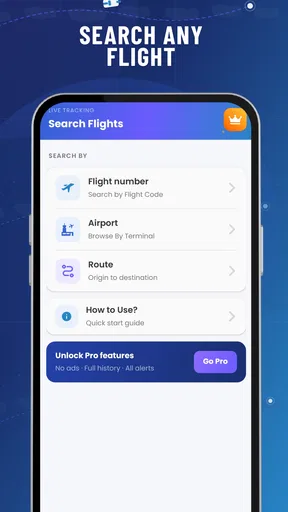
- Search by flight number, airport, or airline is quick and convenient.
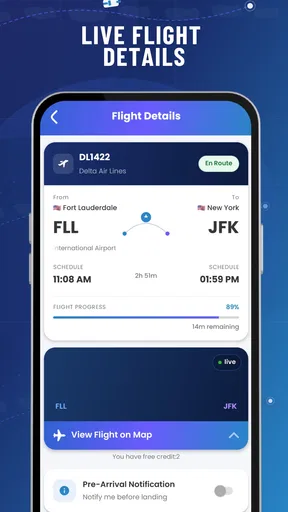
- Detailed flight information includes routes, times, and aircraft data.
- Useful airport views help monitor arrivals and departures at a glance.
- Clean interface makes basic tracking accessible for casual users.
Limitations of Flight Tracker: Live Radar
- Some advanced tracking features require a paid subscription.
- Radar data may occasionally lag or differ from airport updates.
- Coverage and accuracy can vary by region and flight provider.
- The map may consume noticeable battery during extended tracking.
- Frequent notifications can feel excessive without careful customization.
Similar Picks in This Category
View All
Google Maps
Google LLC3.4

Google Maps Go
Google LLC4.1

Booking.com: Hotels & Travel
Booking.com Hotels & Vacation Rentals4.8

Google Earth
Google LLC3.8

Skyscanner Flights Hotels Cars
Skyscanner Ltd4.8

trivago: Compare hotel prices
trivago N.V.4.4
Frequently Asked Questions
What is Flight Tracker: Live Radar, and what does it do?
Flight Tracker: Live Radar is designed to help travelers follow flights in real time using an interactive map and flight information tools. After entering a flight number, route, or airport, you can usually view departure and arrival details, estimated times, aircraft movement, terminal information, and delays. The app is most useful for checking a flight’s current status before leaving for the airport or meeting arriving passengers.
Does Flight Tracker: Live Radar provide genuinely live flight positions?
The app can display aircraft positions and status updates, but the information may not be perfectly instantaneous. Flight data generally comes from aviation tracking services and can be affected by transponder coverage, regional limitations, internet connectivity, and provider delays. Some aircraft may appear with a short delay or may not be visible at all, particularly during certain stages of a flight. Always confirm important changes with the airline or airport.
Is Flight Tracker: Live Radar free to download and use?
Flight Tracker: Live Radar may be available as a free download, but some features can require a subscription, one-time purchase, or in-app payment. Basic flight searches may be accessible without paying, while advanced tools such as unlimited tracking, detailed airport information, alerts, historical data, or an ad-free experience may be reserved for premium users. Check the current store listing for the exact pricing and trial conditions.
Can I receive notifications about delays, gate changes, or arrivals?
Depending on the version and plan you use, Flight Tracker: Live Radar may offer alerts for important flight events, including departures, arrivals, delays, cancellations, and gate changes. To receive them reliably, you normally need to save or follow a flight, allow notifications in your device settings, and maintain an internet connection. Airport and airline systems can update at different times, so alerts should be treated as helpful notifications rather than official confirmation.
What permissions and internet access does the app require?
Flight Tracker: Live Radar needs an internet connection to download current flight schedules, aircraft locations, airport information, and status updates. It may request notification permission for alerts and, depending on its features, location access to identify nearby airports or personalize results. You can review or disable permissions through Android or iOS settings, although restricting notifications or location services may reduce the convenience and accuracy of certain functions.
